FAQ
Cable Derailed from Pulley
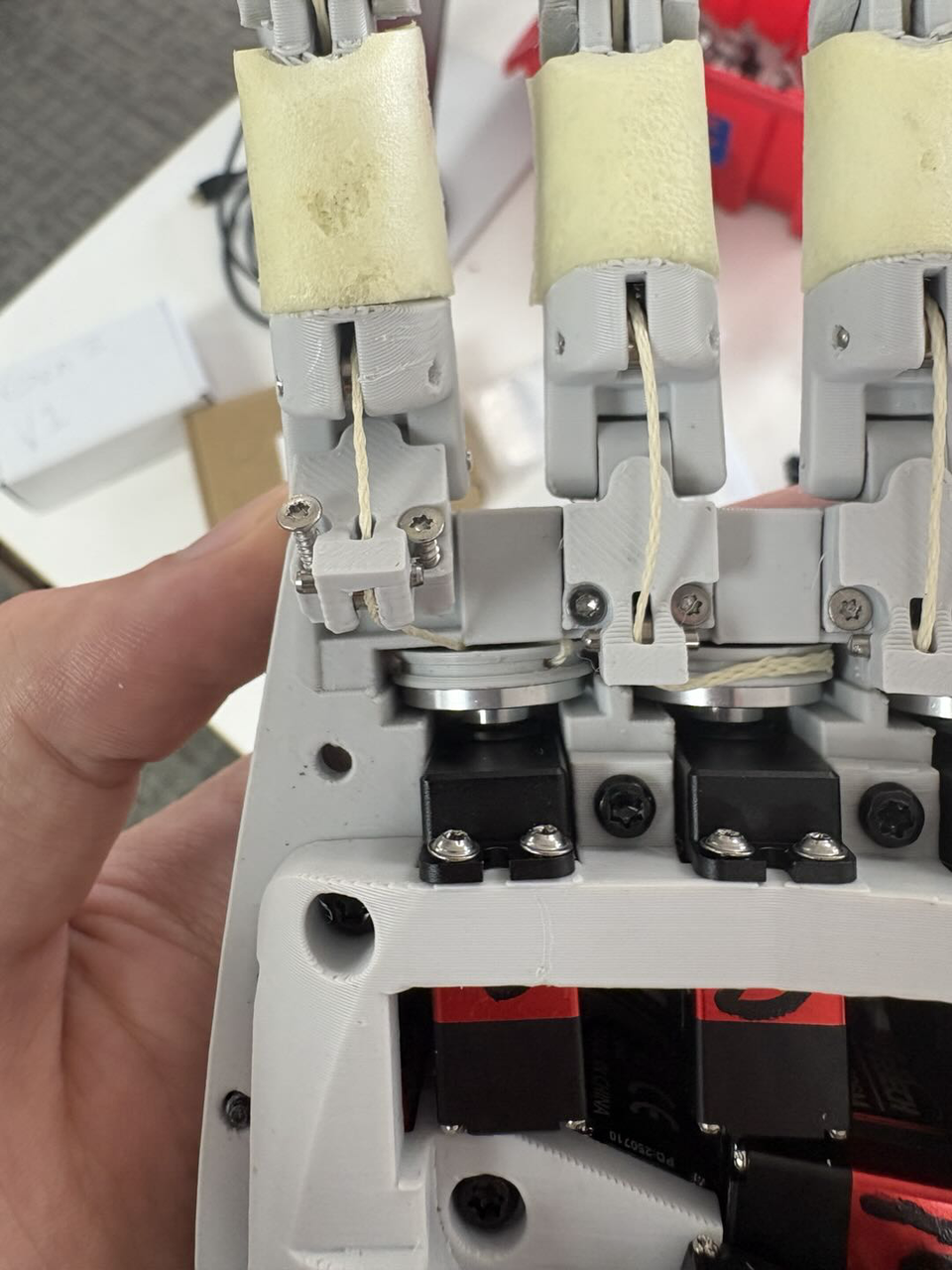
As shown in the picture above for the index finger, sometimes the cable (or another) may derail from the pulley. There are a few ways to fix this:
- If the cable is only slightly derailed, you can try gently pulling it back onto the pulley using your hands or a tweezer. Then, perform the homing procedure again, giving the cable a little tension with your hand so it stays on the pulley.
- If you cannot reposition the cable with your hand or a tweezer, do not overforce or apply too much tension. In this case, you may need to open the hand to resolve the issue safely.
Motor Torque and Temperature Protection Beahvior
Motor overheating occurs only under specific operating conditions and is handled through built-in motor safeguards as well as additional firmware-level protections. This section explains when overheating may happen, how the system responds, and how to operate the hand safely and effectively.
When Overheating can occur
- Motor overheating (motor temperature exceeding 80 °C) occurs only when the motors are continuously stalled at high torque - for example, applying maximum grasp force to an object for an extended period without motion.
- Overheating does not occur during typical use cases such as pick-and-place, manipulation, or transient grasps, even when using high torque values. Continuous full-force stall conditions are required to trigger overheating.
What happens during overheating
- When the motor temperature exceeds 80 °C , the motor’s built-in temperature protection is triggered.
- Once this protection is active, the motors temporarily stop accepting commands until the temperature drops below 80 °C.
- During the cooldown phase, you may observe unexpected behaviors such as the hand resetting to an open position or pending commands being discarded. This behavior is expected and is part of the motor’s self-protection mechanism.
- This overheating protection is a built-in motor feature and cannot be modified or disabled.
Measured stall-duration limits (experimental results)
Based on internal testing under continuous stall conditions:
- Torque = 1000 → ~20 seconds to reach 80 °C
- Torque = 700 (default) → ~2 minutes
- Torque = 500 → more than 10 minutes
These durations apply only when the hand is holding an object at full force without motion.
Active temperature protection (firmware-level prevention mechanism)
- To prevent the motors from reaching the critical temperature limit, the firmware automatically intervenes when the motor temperature reaches 70 °C.
- At this point, the maximum allowable torque is reduced from 1000 to 500.
- The motors continue to accept normal position, speed, and torque commands; however, the effective torque output during execution is capped at 500 to limit further heat buildup.
- This prevention mechanism is implemented at the firmware level starting from version v0.1.4 and onwards, and can be modified by users as needed.
Torque range and recommended settings
- The motors support a torque command range from 0 to 1000.
- The firmware default torque value is 700, which provides a good balance between grasp strength, thermal stability, and continuous operation time.
- We recommend using the default torque value of 700 for most applications to reduce the likelihood of temperature-related interruptions while maintaining strong grasp performance.
- Motor torque can be controlled via the SDK in both position control mode and torque control mode. For examples, see: https://github.com/chestnut-robotics/aero-hand-open/tree/main/sdk/examples
- Advanced users may freely adjust the default torque value and firmware-level temperature protection, with the understanding that doing so increases the risk of motor overheating.